
Choosing a project management tool sounds simple until you actually try to roll one out. One platform feels too rigid, another is “flexible” but chaotic, and the one your team likes most might lack permissions, reporting, or integrations.
The goal is not to find the tool with the longest feature checklist. The goal is to find the tool your team will consistently use to plan work, execute reliably, and communicate progress with minimal overhead.
Below is a practical decision framework you can use to choose the right project management tool, reduce tool churn, and set up a rollout that sticks.
Start with your workflow (and constraints), not the app
Most teams shop for a tool while the real problem is unclear workflow. If the tool becomes the place where you “figure it out later,” it quickly turns into a messy list of tasks nobody trusts.
Before you compare platforms, write down four things:
- What you manage: projects, ongoing operations, requests, campaigns, sprints, client work, or all of the above.
- Who collaborates: internal team only, cross-functional stakeholders, clients, contractors.
- How work enters the system: ad hoc messages, forms, tickets, recurring processes, roadmap planning.
- What “done” means: deliverables shipped, approval received, SLA met, invoice sent, incident resolved.
This gives you the “jobs to be done” your project management tool must support.
A quick self-audit (10 minutes)
Answer these in plain language:
- Where do requests arrive today (email, Slack, meetings)?
- What is the most common failure mode (missed handoffs, unclear ownership, late work, no visibility)?
- What do managers need weekly (status, risk, workload, time/cost)?
- What does the team need daily (priorities, due dates, next actions, focus time)?
If you cannot answer these, no tool comparison will be meaningful yet.
Match the tool to how your team runs projects
Project management tools tend to center around a few “models.” You can force any tool to do almost anything, but forcing it usually costs you in training, maintenance, and adoption.
Common models (and what they imply)
Kanban-style flow
- Best for: continuous work (support, ops, content pipelines), limiting work in progress, visibility across stages.
- Tool implications: strong board view, WIP limits (or at least conventions), easy status changes, automation.
Sprint-based (Scrum) delivery
- Best for: product and engineering teams working in iterations.
- Tool implications: backlog + sprint planning, estimation, capacity, sprint reporting.
Gantt/timeline planning
- Best for: dependency-heavy work (launches, events, construction-like planning), external deadlines, critical path.
- Tool implications: robust timeline view, dependencies, baseline tracking, change management.
Hybrid
- Best for: most modern teams.
- Tool implications: multiple views of the same data (list, board, calendar, timeline) with consistent fields.
If your team lives in flow work but you choose a sprint-first tool, you will fight the software. If you manage dependencies but pick a lightweight task list, you will end up rebuilding a timeline in spreadsheets.
The evaluation criteria that actually predict adoption
Features matter, but adoption usually depends on a few practical factors: how fast people can update work, how clearly the tool reflects reality, and how painless it is to get answers.
Use the criteria below as your evaluation checklist.
| Criterion | What to verify | Red flags to watch for |
|---|---|---|
| Usability and speed | Can a new user create, assign, and update tasks in minutes? Are keyboard shortcuts and bulk edits available? | Too many clicks to do basic updates, slow loading, confusing navigation |
| Work intake | Can you standardize requests (forms, templates, email forwarding, simple triage)? | Work still arrives in DMs and meetings because intake is awkward |
| Views that match roles | Do ICs, leads, and execs each get a useful view without duplicating data? | Separate “shadow boards” appear because the main view is unusable |
| Collaboration quality | Comments, approvals, file handling, notifications, @mentions, async updates | Notification spam, missing context, or conversations split across tools |
| Automation and rules | Can you automate routing, status changes, reminders, and handoffs safely? | Automations are fragile, hard to audit, or require heavy admin work |
| Reporting and visibility | Can you answer: what’s at risk, what’s blocked, what’s late, who’s overloaded? | Reporting requires exporting data every week |
| Integrations and ecosystem | Calendar, chat, docs, storage, dev tools, CRM, support desk | Integrations are “one-way only,” break often, or require paid add-ons |
| Permissions and governance | Space/project permissions, guest access, auditability, data retention | Cannot separate teams/clients cleanly, unclear admin controls |
Two criteria people underestimate
1) Governance cost
A tool that can do everything often requires more ongoing administration (templates, permissions, fields, automations). That is fine if you have an owner, but dangerous if nobody has time.
2) How the tool handles “too much work”
Most teams have more requests than capacity. The best tool is the one that makes prioritization explicit instead of hiding overload.
Use a scoring matrix (so you do not choose based on vibes)
Once you have 5 to 8 criteria, use a simple scoring matrix to compare tools consistently. Keep it lightweight. The point is clarity, not perfect math.
Here is a sample structure you can copy into Google Sheets:
| Category | Weight (example) | Tool A score (1-5) | Tool B score (1-5) | Notes to justify the score |
|---|---|---|---|---|
| Usability | 20% | |||
| Views and planning | 15% | |||
| Collaboration | 10% | |||
| Automation | 15% | |||
| Reporting | 15% | |||
| Integrations | 10% | |||
| Permissions/security | 10% | |||
| Cost and scaling | 5% |
A few rules that keep this honest:
- Write the justification in the notes column, especially for 4s and 5s.
- Score based on your workflow, not on what the vendor demo shows.
- Separate “must-have” from “nice-to-have.” If a must-have fails, that tool is out, even if the total score looks good.
Run a 14-day pilot that surfaces the real problems
Demos rarely reveal daily friction. A pilot does.
A good pilot is small enough to finish and real enough to be painful in the right ways.
What to pilot
Pick one workflow that represents your reality, for example:
- Marketing: campaign intake to launch
- Operations: recurring requests with SLAs
- Product/engineering: backlog to delivery
- Agency/client work: approvals and deliverables
Define a clear pilot scope: one team, one project type, and one source of intake.
What to measure (simple, practical signals)
You do not need complex analytics. Track:
- Weekly update rate: are tasks getting updated without nagging?
- Time to find the truth: can a stakeholder see status in under 60 seconds?
- Handoff reliability: are owners and due dates clear at each stage?
- Notification noise: do people mute it, or does it help them?
If your team already uses time tracking, your pilot can also test whether project data and time data match. (If you use ClickUp, this is where features like time estimates and reporting become relevant. See our guide on using ClickUp time tracking for busy hour analysis.)
Avoid the most common tool-selection mistakes
These are the patterns that cause teams to switch tools every 6 to 18 months.
Mistake 1: Using spreadsheets or docs as the “system”
Spreadsheets are great for analysis, but they are usually poor as a living project system because updates, ownership, permissions, and automation are fragile.
If your team is currently managing projects in sheets and docs, it helps to review what purpose-built platforms do differently and what to evaluate when switching. This guide on choosing the best project platform for your team lays out practical selection criteria and why the “wrong tool” often fails at collaboration.
Mistake 2: Choosing based on edge-case features
Teams often pick a tool because it supports one advanced feature they might use later (complex dependencies, advanced scripting, custom objects). If the everyday experience is slow, adoption drops, and the advanced feature never matters.
A better approach: choose the tool that makes daily updates effortless, then solve advanced needs with add-ons or lightweight processes.
Mistake 3: Over-customizing on day one
Custom fields, statuses, automations, and dashboards are powerful, but too much too early creates confusion.
Start with:
- A minimal set of statuses
- A consistent definition of “priority”
- A single source of intake
- One or two templates
Then expand based on what the pilot proves you actually need.
Mistake 4: Ignoring integration reality
An integration listed on a pricing page can still be shallow. In your pilot, test the specific flows you need, such as:
- Creating tasks from forms or emails
- Syncing due dates with calendars
- Posting status updates to Slack or Teams
- Linking files from Drive/OneDrive
If you rely heavily on calendar-based planning, you may also want to standardize focus time and buffers around project work. (For scheduling protection, see how to auto-block prep time before scheduled events.)
Choose for the next 12 months, not the next 5 years
A practical rule: optimize for your next year of execution.
Why? Because:
- Your team structure will change.
- Your processes will mature.
- Your integration needs will evolve.
So instead of buying the “forever tool,” buy the tool that:
- Fits your current workflow and skills
- Can scale moderately (more projects, more users, more templates)
- Exports data cleanly if you ever need to migrate
Vendor lock-in is less scary when your data model is simple and your governance is documented.
Rollout tips that make the tool stick
Tool rollout fails when it is treated as a software install instead of an operating system change.
Define a minimum operating standard
Write a short policy your team can follow, for example:
- Every task has an owner and a due date (or a “no due date” reason)
- Status is updated at least twice per week
- Work enters through one intake path
- Priority rules are consistent (for example P0/P1/P2, or High/Medium/Low)
Build one “golden” template per workflow
Templates reduce decision fatigue. Whether you manage projects in a dedicated PM platform or in a flexible system, the pattern is the same: standardize the data.
If you are using Notion for project operations, database structure and property design matter more than aesthetics. Our guide on creating Notion databases for project management goes deep on views, properties, and scaling without turning your workspace into a maze.
Assign a tool owner
This does not need to be a full-time admin, but someone must own:
- Templates and naming conventions
- Permission requests
- Automation changes
- Quarterly cleanup (archiving, field pruning)
Without ownership, your tool becomes cluttered, and people stop trusting it.
Frequently Asked Questions
What is the best project management tool for a small team? A small team usually needs speed and clarity more than advanced controls. Prioritize usability, flexible views (list and board), and simple intake. Run a short pilot to confirm adoption before committing.
Should we choose a tool based on Kanban, Scrum, or Gantt? Choose based on how your team actually works. Flow-based work fits Kanban best, iteration-based delivery benefits from Scrum features, and dependency-heavy schedules often need strong timeline or Gantt support.
How many tools should we shortlist before a pilot? Three is usually ideal. Fewer limits comparison, more creates evaluation fatigue. Use a scoring matrix to narrow to 2 finalists, then pilot the top pick if time is tight.
What features matter most for long-term adoption? Fast task updates, role-based views, good notifications, and low governance overhead tend to matter more than advanced reporting or customization.
How long should a pilot run? Two weeks is enough for most teams to surface friction around intake, updates, handoffs, and reporting. If your projects run in longer cycles, extend to 3 to 4 weeks, but keep scope narrow.
Next step: turn your decision into a repeatable process
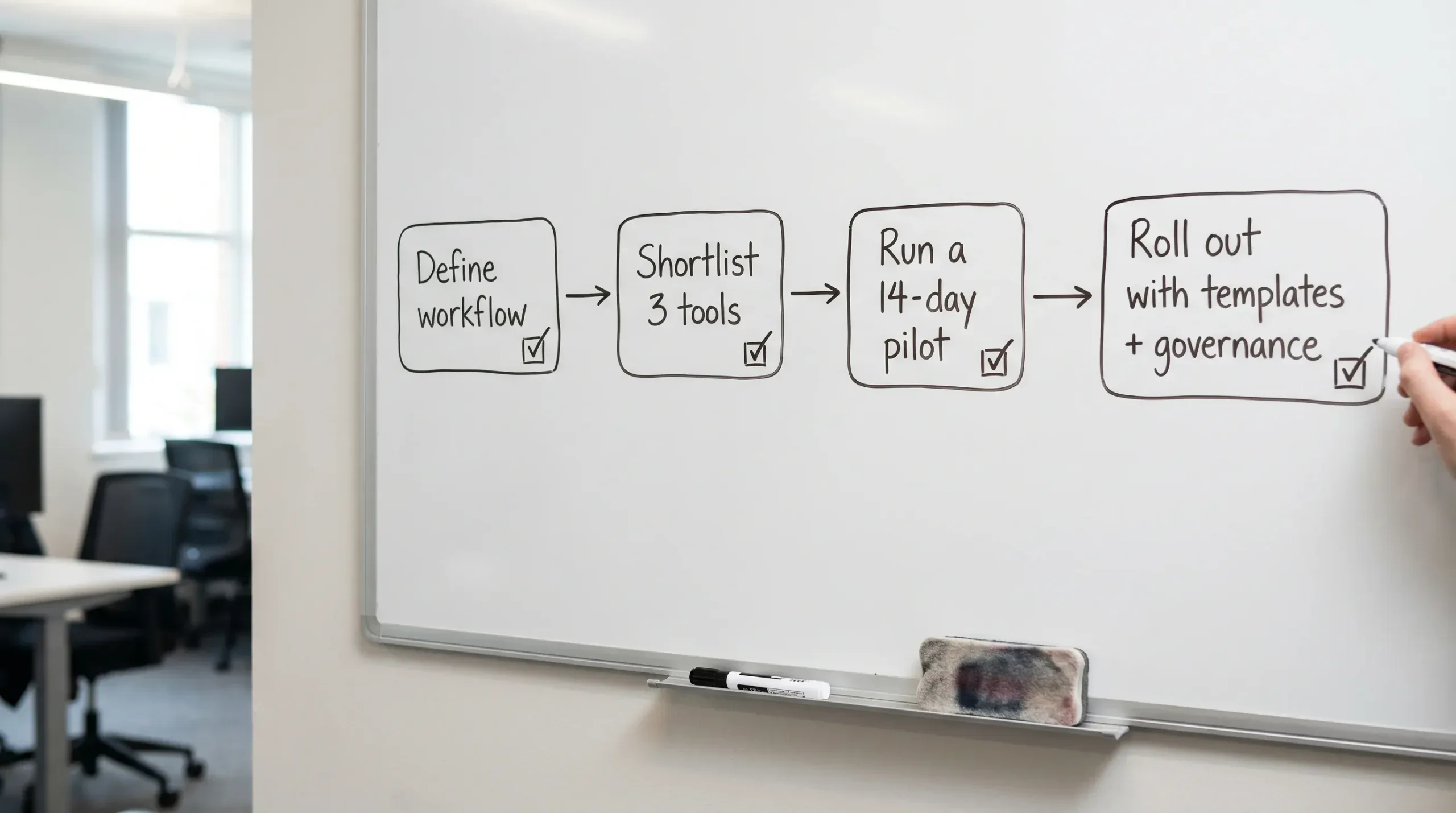
If you want your next project management tool to last, treat selection like a mini project: define the workflow, score consistently, pilot with real work, then roll out with templates and governance.
For more step-by-step setups and tool-specific workflows, explore the latest tutorials and comparisons on Online Tool Guides.



