
If you only want the fastest path to your first working automation, Zapier is usually easier. Its step-by-step builder, plain-language setup screens, and huge app directory make it friendly for beginners and nontechnical teams.
But the full answer is more interesting. Make can become easier once your workflow has multiple branches, data transformations, repeating steps, or visual logic. It has a steeper learning curve at the start, but its canvas makes complex automations easier to see and adjust.
So the real question is not just “Zapier vs Make, which automation tool is easier?” It is: easier for what kind of user, team, and workflow?
This guide breaks that down in practical terms so you can choose the automation tool that will feel easier after week one, not just during the first 10 minutes.
Quick verdict: Zapier is easier to start, Make is easier to visualize
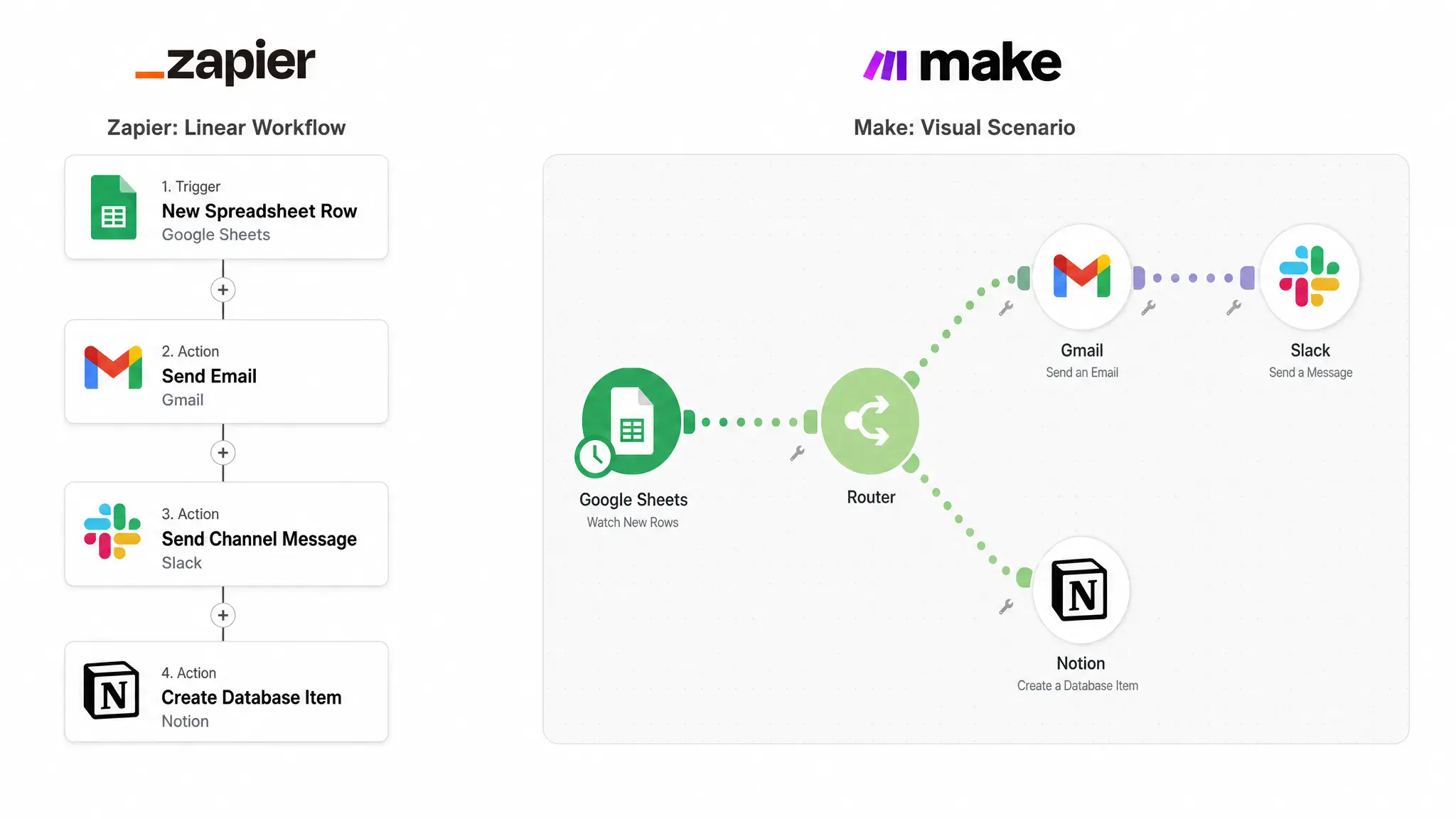
For most beginners, Zapier wins on ease of use. You choose a trigger, add one or more actions, test each step, then turn the Zap on. The experience feels like filling out a guided form.
Make, formerly Integromat, uses a visual scenario builder. You place modules on a canvas and connect them into flows. That can feel unfamiliar at first, especially if you have never built automations before. However, once your workflow involves branching logic, multiple apps, filters, data parsing, or loops, Make’s visual approach can be easier to understand than a long vertical sequence of steps.
| Ease factor | Easier tool | Why |
|---|---|---|
| First automation | Zapier | Guided setup and simple trigger-action structure |
| Nontechnical teams | Zapier | Less visual logic to learn at the beginning |
| Complex branching | Make | Visual routers make multiple paths easier to follow |
| Data formatting and transformation | Make | More control inside the scenario canvas |
| Quick app-to-app workflows | Zapier | Fast setup for common SaaS tasks |
| Debugging visual flows | Make | Execution history shows how data moves through modules |
| Explaining workflows to stakeholders | Depends | Zapier is clearer for simple steps, Make is clearer for complex diagrams |
If you are automating a few straightforward tasks, start with Zapier. If you already know your workflow will become multi-step and logic-heavy, Make may be worth learning early.
How Zapier feels to use
Zapier’s core concept is a Zap. A Zap starts with a trigger, such as “new form submission,” then runs one or more actions, such as “create a task,” “send a Slack message,” or “add a row to a spreadsheet.”
That structure is easy because it mirrors how most people describe work: when this happens, do that.
Zapier is especially approachable for users who want to automate task assignments, notifications, CRM updates, spreadsheet logging, email follow-ups, or simple lead routing without learning technical concepts.
The builder walks you through each step. You connect an app, choose an event, map fields, test the result, and publish. This makes Zapier one of the easiest automation tools for people who think in checklists rather than flowcharts.
Where Zapier feels easiest
Zapier is strongest when your workflow follows a mostly linear sequence.
For example, a simple marketing workflow might look like this: a new Typeform response arrives, Zapier creates a HubSpot contact, adds the person to Mailchimp, and posts a Slack notification. Each step is easy to understand because the automation moves downward in a clear order.
Zapier also has a large template ecosystem, so you often do not have to start from a blank screen. If you are automating common tools like Gmail, Slack, Google Sheets, Trello, Asana, Notion, ClickUp, or HubSpot, there is a good chance Zapier already has a template close to what you need.
This matters for beginners. The hardest part of automation is not always the tool itself. It is knowing what should happen first, what data should move where, and what to test. Templates reduce that blank-page problem.
Where Zapier becomes less easy
Zapier can become harder to manage when your workflow becomes less linear. You can add filters, paths, formatters, delays, and webhooks, but long Zaps can start to feel like a stack of hidden rules.
For example, if you need one lead workflow that branches based on region, company size, product interest, sales owner, meeting status, and lifecycle stage, Zapier can handle many of those needs, but the setup may feel more like maintaining a long configuration file than viewing a process map.
The same is true for workflows that need repeated actions, advanced data manipulation, or multiple nested conditions. Zapier is still powerful, but its beginner-friendly structure can feel less elegant as complexity grows.
How Make feels to use
Make’s core concept is a scenario. A scenario is a visual workflow made of connected modules. Each module represents an app action, data operation, filter, router, iterator, aggregator, or other step.
Instead of moving through a vertical setup wizard, you build on a canvas. You can zoom out and see the whole automation at once.
That visual layout is the biggest reason some users find Make easier than Zapier, especially if they are comfortable with systems thinking. You can see where the workflow starts, where it splits, where data is transformed, and where errors might occur.
Where Make feels easiest
Make is easier when you need to understand the shape of a workflow.
For example, imagine a content operations process where a new Airtable record triggers several possible paths. If the record is a blog draft, create a ClickUp task. If it is a video asset, send it to a review channel. If it is a design request, notify the creative team and create a folder in cloud storage. If the field is incomplete, send it back for revision.
In Make, that can be represented visually with routers and filters. Once you understand the canvas, the workflow is easier to explain because stakeholders can literally see the process.
Make is also strong for users who want more detailed control over data. It is often a good fit for operations teams, technical marketers, data-minded creators, and teams building repeatable digital workflow optimization systems.
Where Make feels harder
Make’s first-time experience can be intimidating. Terms like module, router, iterator, array, bundle, and aggregator may slow down beginners who simply want to connect two apps.
The visual canvas is powerful, but it can also invite overbuilding. New users may create complex scenarios before they fully understand how data passes from one module to the next. That can lead to errors, messy workflows, or unexpected operation usage.
In short, Make is not necessarily harder because it is less usable. It is harder because it exposes more automation concepts earlier.
Zapier vs Make for common automation tasks
The easiest tool depends heavily on the task you are trying to automate. Here is a practical comparison for common use cases.
| Use case | Easier choice | Notes |
|---|---|---|
| Send a Slack message when a form is submitted | Zapier | Fast template-based setup |
| Add new email subscribers to a CRM | Zapier | Simple field mapping and testing |
| Create tasks from form responses | Zapier | Great for straightforward task management tools |
| Route leads based on several conditions | Make | Visual branching is easier to inspect |
| Transform messy data before sending it to another app | Make | More flexible data handling |
| Sync status across multiple apps | Zapier | Easier if the workflow is linear and app support is strong |
| Build a multi-path approval workflow | Make | Easier to visualize approvals, rejections, and fallbacks |
| Automate creative production steps | Make | Better when many assets, paths, and review states are involved |
For example, if you are trying to sync task or availability updates across tools, Zapier’s guided approach may be simpler. Our guide on using Zapier to update status across multiple apps goes deeper into that kind of workflow.
If your team is running more advanced creative AI production workflows, automation may need to connect people, tools, model outputs, review stages, and cost controls. In that kind of environment, platforms such as Virtuall’s creative AI operating layer can be relevant alongside general automation tools, especially when AI work needs more governance than a simple app-to-app trigger.
Which tool is easier for beginners?
Zapier is easier for most beginners because it asks fewer conceptual questions upfront.
You do not need to think much about workflow architecture. You choose a trigger, choose an action, connect accounts, map fields, and test. Zapier also uses familiar language throughout the builder, which reduces friction for people who are not technical.
Make is still beginner-friendly compared with many automation platforms, but it expects users to become comfortable with a canvas and data flow. For some people, that clicks quickly. For others, it feels like learning a new visual programming system.
If you are choosing for a team with mixed technical confidence, Zapier is usually the safer first recommendation. It is easier to delegate, easier to document in plain English, and easier for a new team member to edit without breaking something.
Which tool is easier for advanced workflows?
Make often becomes easier once workflows become advanced.
That may sound contradictory, but it is common with automation tools. The beginner-friendly option can be easiest for simple work, while the more technical option becomes easier when the workflow has many moving parts.
Here are signs that Make may be the easier long-term choice:
- You need several branches from one trigger.
- You often transform, split, combine, or clean data.
- You want to see the full workflow on a canvas.
- You need to inspect exactly how each item moved through a scenario.
- You are building automations for operations, reporting, creative production, or internal systems.
Zapier can still support advanced workflows, especially with paths, filters, formatter steps, and webhooks. But the more your automation resembles a process diagram, the more Make’s interface starts to feel natural.
Setup speed: Zapier usually wins
If your goal is to launch an automation in the next 15 minutes, Zapier is usually faster.
This is especially true for common workflows that already have templates. You can often search for the apps you use, select a suggested workflow, connect accounts, and test the automation with minimal setup.
Make can also be quick, but it often requires more decisions. You need to place modules, connect them, choose how data moves between them, and sometimes configure more granular options. That extra control is valuable, but it can slow down the first build.
For individuals, freelancers, and small businesses trying automation for the first time, setup speed matters. A tool that helps you get one useful automation live quickly is more likely to become part of your daily workflow.
Testing and troubleshooting: it depends on how you think
Both Zapier and Make provide testing and run history, but they present troubleshooting differently.
Zapier’s testing process is straightforward. You test each step, review sample data, and confirm whether the output looks right. This works well for linear workflows because you can validate the automation one block at a time.
Make’s troubleshooting becomes powerful once you understand its execution view. You can watch a scenario run and inspect the data passing through each module. For visual thinkers, this can make errors easier to locate. If a branch does not run, a filter blocks data, or a module receives the wrong value, the canvas can make the issue visible.
The tradeoff is that Make’s debugging language can feel more technical. Zapier is easier for simple troubleshooting. Make is often easier for diagnosing complex data flow problems.
Pricing simplicity: read the usage rules carefully
Ease of use is not only about the interface. It is also about understanding what your automation will cost.
Zapier and Make use different usage models, and plan details can change. In general, Zapier usage is commonly discussed in terms of tasks, while Make usage is commonly discussed in terms of operations. The practical point is that every automated step may consume part of your plan allowance.
This can affect perceived ease. A workflow that looks simple may use more tasks or operations than expected if it runs frequently or processes multiple records. Before committing to either platform, build a realistic test automation and estimate monthly volume.
Ask these questions before choosing:
- How many times will this automation run per day?
- How many steps happen each time it runs?
- Does it process one record or many records at once?
- What happens if the automation fails midway?
- Who will monitor usage and errors?
For a simple two-step workflow, pricing is usually easy to estimate. For larger operations, usage forecasting becomes part of the learning curve no matter which tool you choose.
Team collaboration and governance
For teams, the easier tool is the one people can safely use without creating hidden chaos.
Zapier is often easier for teams that want standardized, simple automations owned by departments like marketing, sales, support, or HR. Its guided builder makes it easier to train nontechnical users, and workflow intent is usually clear when Zaps are named well.
Make can be easier for teams with a more operations-focused automation owner. A well-built Make scenario can show the complete workflow visually, which helps with audits and handoffs. However, if many people edit scenarios without standards, the canvas can become messy.
Whichever platform you choose, create basic governance rules early. Use clear naming conventions, document who owns each automation, test changes before publishing, and review active automations regularly. Automation saves time only when people trust it.
Real-world examples: which tool would I choose?
Let’s make the comparison more concrete.
For a solo creator who wants to save new leads from a form into Google Sheets and receive a Gmail notification, Zapier is the easier choice. There is no need to learn a visual automation canvas for that.
For a small agency that wants new client intake forms to create project folders, assign tasks, notify different Slack channels, and route requests based on service type, Make may be easier after the first setup. The visual branching will help the team understand what happens to each request.
For a sales team that wants a simple lead alert when a Calendly meeting is booked, Zapier is probably easier. If that same team needs territory routing, enrichment, CRM updates, fallback owners, and SLA reminders, Make becomes more attractive.
For a content team building a repeatable editorial workflow across Airtable, Notion, Google Drive, Slack, and a project management tool, either can work. Zapier is easier if the workflow is linear. Make is easier if the process branches by content type, approval stage, or publishing channel.
Decision framework: choose the tool that matches your workflow shape
A simple way to decide is to sketch your workflow before choosing the platform.
If your sketch looks like a straight line, Zapier is probably easier. If your sketch looks like a flowchart, Make may be easier.
| Your workflow looks like… | Recommended tool | Reason |
|---|---|---|
| One trigger, one action | Zapier | Fastest and simplest setup |
| One trigger, three simple actions | Zapier | Linear workflows are easy to maintain |
| One trigger with several conditional paths | Make | Visual routing is clearer |
| Many data cleanup steps | Make | More control over data transformation |
| A workflow owned by nontechnical staff | Zapier | Lower learning curve |
| A workflow owned by an operations specialist | Make | More flexibility and visibility |
| A temporary quick fix | Zapier | Easy to launch quickly |
| A core business process | Depends | Choose based on complexity, volume, and maintenance needs |
Do not choose based only on feature lists. Choose based on who will build, maintain, troubleshoot, and explain the automation six months from now.
Best practice: test one real workflow in both tools
If you are seriously comparing Zapier vs Make, do not rely only on screenshots or reviews. Pick one real workflow and build a small version in both tools.
Use the same trigger, the same apps, and the same expected output. Then compare how long it takes to build, how easy it is to test, how readable it feels, and how confident you are that someone else could maintain it.
A good pilot workflow should be useful but not mission-critical. For example, try automating a form submission into a task management tool, a spreadsheet, and a Slack message. Then add one condition, such as routing based on priority or department.
That small test will reveal more than a generic feature comparison because ease of use is personal. Some users immediately prefer Zapier’s guided setup. Others understand Make faster because they can see the workflow visually.
Final recommendation: which automation tool is easier?
Zapier is easier for beginners, quick wins, and straightforward app-to-app automations. If you are new to automation or want your team to create simple workflows without much training, start there.
Make is easier for complex, visual, logic-heavy workflows once you get past the initial learning curve. If you need branching, data transformation, multi-step operations, or a process map you can inspect visually, Make may be the better long-term fit.
The best choice is not the tool with the most features. It is the tool that makes your specific workflow easier to build, easier to trust, and easier to maintain.
Frequently Asked Questions
Is Zapier easier than Make? Yes, Zapier is generally easier for beginners and simple automations because it uses a guided trigger-action setup. Make has a steeper learning curve but can be easier for complex visual workflows.
Is Make better than Zapier for complex automations? Often, yes. Make’s visual canvas, routers, and detailed data handling can make complex workflows easier to understand and troubleshoot, especially when there are multiple branches or transformations.
Can Zapier and Make automate the same apps? In many cases, yes. Both support a wide range of popular business, productivity, marketing, and task management tools. Before choosing, check whether your exact apps and required triggers or actions are supported.
Which tool is better for small businesses? Zapier is usually better for small businesses that want quick, simple automations. Make may be better for small businesses with more advanced operational workflows or someone comfortable managing automation logic.
Should I switch from Zapier to Make? Consider switching if your Zaps have become long, hard to understand, expensive to run, or difficult to troubleshoot. If your current Zaps are simple and reliable, switching may not be necessary.
Can beginners learn Make? Yes. Beginners can learn Make, especially if they like visual tools and are willing to understand basic automation concepts. Start with one simple scenario before building advanced workflows.
Build a smarter automation stack
The easiest automation tool is the one that fits the way you actually work. Start small, document your workflows, and test before automating anything critical.
For more practical tutorials and tool comparisons, explore the productivity and automation guides on Online Tool Guides. If you are building your first automation, our guides on Zapier, Airtable, ClickUp, Slack, and calendar workflows can help you turn repetitive work into reliable systems.



