
Project plans rarely begin as polished timelines. They usually start as half-formed ideas, feature requests, risks, dependencies, meeting notes, and “we should probably do this” comments scattered across docs and chats. A good mind mapping tool gives that early chaos a shape before you commit to tasks, dates, and owners.
The best mind mapping tools for planning projects help you move from exploration to execution. They let you branch ideas, group related work, spot missing pieces, and then hand the plan off to your task management system without losing context.
Below is a practical comparison of the strongest options for individuals, project managers, remote teams, product teams, consultants, educators, and creative teams.
Why mind mapping works so well for project planning
Mind maps are useful because they match how planning actually happens. Instead of forcing every idea into a linear document too early, you can start with a central goal and branch outward into deliverables, milestones, stakeholders, risks, resources, and next steps.
That makes mind mapping especially helpful when you need to:
- Define the scope of a new project
- Break a large goal into workstreams
- Compare possible approaches before choosing one
- Capture ideas during a kickoff or brainstorming session
- Turn vague requirements into a clear execution plan
- Identify dependencies, blockers, and decision points
Mind maps are not a replacement for a full project management system. They are the planning layer before the task layer. Once your map becomes specific enough, you can convert branches into tasks, assign owners, add dates, and leverage project management features to track progress in a project management tool. If your team is still evaluating that next step, this guide on how to choose the right project management tool is a useful companion.
Best mind mapping tools at a glance
| Tool | Best for | Project planning strength | Watch out for |
|---|---|---|---|
| Miro | Collaborative teams | Workshops, strategy maps, stakeholder planning | Can feel too broad if you only need simple maps |
| MindMeister | Clean online mind maps | Structured brainstorming and meeting planning | Best when you want classic mind mapping, not full whiteboarding |
| Xmind | Individual planners and consultants | Polished, detailed maps and presentation-ready structures | Collaboration is not the main focus compared with team-first tools |
| ClickUp Mind Maps | Teams turning ideas into tasks | Connecting planning directly to execution | Works best if your team already wants a project management hub |
| Whimsical | Fast visual planning | Lightweight maps, flowcharts, and product planning | Less suited to complex portfolio-level project planning |
| Ayoa | Creative brainstorming | Organic maps, task views, and idea development | Interface style may not fit every corporate team |
| MindNode | Apple users | Personal planning and clean visual organization | Limited fit for teams outside the Apple ecosystem |
| Coggle | Simple browser-based mapping | Quick shared diagrams with minimal setup | Advanced planning and task features are limited |
| Lucidspark | Enterprise visual collaboration | Brainstorming, mapping, and structured team sessions | More powerful than necessary for very small projects |
| Milanote | Creative projects | Moodboards, visual briefs, and content planning | Not a traditional radial mind mapping app |
How to choose the right mind mapping tool
The best tool depends less on the longest feature list and more on what happens after the brainstorming session. A mind map that looks impressive but never turns into action is not helping your project.
Start by asking how your team plans. If you run live workshops, you need real-time collaboration, voting, comments, templates, and presentation-friendly boards. If you plan alone before sharing a proposal, you may prefer a focused desktop-style tool with beautiful exports. If your team wants to move directly from branches to assigned work, a tool with task management connections is more important than visual polish.
You should also consider how close your mind map needs to be to your wider workflow. Some teams want a dedicated mind mapping app because it keeps ideation clean and distraction-free. Others prefer an online whiteboard because mind maps are only one part of a larger planning session that includes sticky notes, journey maps, diagrams, and prioritization grids. If that sounds like your team, compare dedicated mapping apps with broader online whiteboard tools for team planning.
File context matters too. Many project maps depend on briefs, research PDFs, client assets, SOPs, or deliverables. Instead of attaching everything to the map itself, it can be cleaner to keep source materials in a separate file workflow. For example, teams that share assets through chat and social channels may find a Telegram-first AI file control platform like Cloudon useful for storing, summarizing, and sharing files while the mind map stays focused on project structure.
The best mind mapping tools for planning projects
1. Miro: Best overall for collaborative project planning
Miro is one of the strongest choices when your project planning happens with other people in real time. It works especially well for kickoff sessions, discovery workshops, product planning, stakeholder mapping, and strategic planning.
Its biggest advantage is flexibility. You can build a traditional mind map, then surround it with sticky notes, diagrams, kanban-style sections, timelines, voting areas, and reference materials. That makes Miro useful when your planning session needs to move beyond a simple branch structure.
For project managers, Miro is a good fit when the plan is still being shaped. You can start with a central project goal, add branches for deliverables, risks, audiences, milestones, and dependencies, then reorganize everything as the team discusses priorities. Remote teams will appreciate the benefits of flexible collaboration tools that allow multiple people to contribute at the same time without needing a rigid meeting format.
Miro is less ideal if you only want a lightweight personal mind map. Because it does so many things, it can feel like more workspace than you need for simple solo planning.
Best use case: Team workshops where mind mapping is part of a larger planning process.
2. MindMeister: Best dedicated online mind mapping tool
MindMeister is a strong choice for users who want a clean, purpose-built mind mapping experience. It is less sprawling than a full digital whiteboard, which can be a benefit if your goal is to create clear project maps quickly.
For planning projects, MindMeister works well for brainstorming phases, meeting agendas, project outlines, campaign planning, and early scope definition. Its interface encourages structured thinking without making the map feel too technical.
A key advantage is that it feels approachable. Team members who are new to mind mapping can usually understand the format quickly. That makes it useful for cross-functional planning sessions where you do not want to spend the first 15 minutes explaining the tool.
MindMeister is best when your output is a structured visual outline. If you need advanced diagramming, large workshop canvases, or deep project tracking, you may eventually pair it with another tool.
Best use case: Clear, collaborative project maps without the complexity of a full whiteboard platform.
3. Xmind: Best for polished solo planning and presentations
Xmind is a favorite among people who create detailed, attractive maps for thinking, planning, and presenting. It is particularly useful for consultants, strategists, content planners, educators, and solo project leads who want a map that looks organized and professional.
For project planning, Xmind is an excellent mind mapping tool when you need to think deeply before involving a larger team. You can use it to map a proposal, outline a product launch, structure a training program, or break down a complex initiative into phases.
Xmind’s strength is its balance of structure and visual quality. Maps can be refined into a polished format, which makes them useful in stakeholder presentations or planning documents. It also supports different map styles, so you are not limited to one visual format.
The trade-off is collaboration. While Xmind can support sharing and modern workflows, it is not as team-session-oriented as tools like Miro, Lucidspark, or MindMeister. If your planning process is mostly live and collaborative, choose a team-first tool.
Best use case: Individual planning, consulting deliverables, and presentation-ready project maps.
4. ClickUp Mind Maps: Best for turning ideas into tasks
ClickUp Mind Maps are a strong option if your team wants the mind map and the project execution system to live close together. Instead of brainstorming in one tool and manually rebuilding the plan elsewhere, you can use mind maps as part of a broader project management workflow.
This is useful for teams that already think in tasks, lists, dependencies, and owners. A project manager can map out workstreams, break deliverables into subtasks, and then connect the visual structure to execution. That makes ClickUp especially relevant for marketing teams, agencies, operations teams, and product teams managing multiple moving parts.
The biggest benefit is continuity. Your mind map is not just a brainstorming artifact, it can become the starting point for tracked work. If your team struggles with the gap between ideation and follow-through, this is a major advantage.
The trade-off is that ClickUp is a broader productivity platform. If you only want a simple visual brainstorming tool, it may feel heavier than necessary. But if you want mind mapping inside a complete task management environment, it is one of the most practical choices.
Best use case: Teams that want to convert project ideas into trackable work.
5. Whimsical: Best lightweight tool for fast visual planning
Whimsical is excellent for teams that want visual planning without a steep learning curve. It supports mind maps along with flowcharts, wireframes, docs, and other planning formats, which makes it especially useful for product teams, startups, UX teams, and content teams.
The experience is fast and clean. You can open a board, map the structure of a project, sketch a process, and clarify a workflow without spending much time formatting. That speed is valuable when you are planning in a meeting and need the tool to stay out of the way.
For project planning, Whimsical is particularly good for early product ideas, feature breakdowns, website planning, customer journey thinking, and lightweight execution maps. It is not trying to be the most advanced project management system, and that simplicity is part of its appeal.
If your projects involve heavy resource planning, complex dependencies, or formal reporting, Whimsical will probably be one piece of your workflow rather than the center of it.
Best use case: Fast visual planning for product, content, and startup teams.
6. Ayoa: Best for creative brainstorming and idea development
Ayoa combines mind mapping with task-oriented planning features, making it a good fit for creative teams and visual thinkers. It offers a more organic approach to idea mapping than many rigid tools, which can help when you are exploring possibilities rather than documenting a fixed plan.
For project planning, Ayoa works well when creativity is central to the process. Campaign concepts, event plans, content themes, product ideas, and innovation workshops can all benefit from its visual style. You can begin with loose ideas, group them into themes, and then move toward more actionable planning.
Ayoa may appeal to users who find traditional project management tools too linear. It gives ideas room to develop before they become formal tasks. That makes it useful in the fuzzy front end of a project, when the team knows the goal but has not yet defined the best path.
Its visual personality may not suit every organization. Teams that prefer minimalist interfaces or highly structured project controls may prefer ClickUp, Miro, or Lucidspark.
Best use case: Creative teams that want brainstorming and planning in the same visual workspace.
7. MindNode: Best for Apple users and personal project planning
MindNode is a polished mind mapping tool for users in the Apple ecosystem. It is especially good for personal planning, writing projects, learning plans, solo business ideas, and serves as one of the best project planning tools for early project outlines.
Its main strength is focus. MindNode makes it easy to capture an idea, expand it, reorganize it, and keep the map visually clean. For individual project planning, that can be more valuable than having dozens of collaboration features you never use.
A freelancer might use MindNode to plan a client project before creating a proposal. A student might map a research project. A founder might outline a new offer or product concept. In each case, the value is in clarifying the structure of the work before moving it into a schedule or task list.
MindNode is not the best choice for mixed-device teams or large collaborative sessions. It shines when one person needs a calm, attractive space to think.
Best use case: Solo planning and personal project organization for Apple users.
8. Coggle: Best simple browser-based mind mapping tool
Coggle is one of the easiest ways to create a mind map online. It is browser-based, simple to understand, and useful when you need to map ideas quickly without configuring a complex workspace.
For project planning, Coggle is a good fit for straightforward use cases: brainstorming a small project, outlining a process, planning a meeting, creating a decision tree, or mapping a simple content plan. It is also helpful for teams that want a low-friction tool that does not require much training.
Its simplicity is both the strength and the limitation. Coggle is not designed to replace a project management platform or enterprise whiteboard. It is best when the map itself is the deliverable or when you only need a quick planning artifact before moving to another system.
If your planning needs are modest, Coggle can be refreshingly efficient. If your team needs advanced collaboration, templates, integrations, or structured task handoff, look at the more robust tools in this list.
Best use case: Quick, simple mind maps with minimal setup.
9. Lucidspark: Best for enterprise planning workshops
Lucidspark is a strong option for teams that need structured visual collaboration at scale. It is particularly useful for organizations that run facilitated planning sessions, cross-functional workshops, and complex brainstorming activities.
For project planning, Lucidspark can support mind maps, sticky note sessions, prioritization exercises, and decision-making frameworks. That makes it useful for larger teams where the planning process needs to be more guided and documented.
One of Lucidspark’s strengths is helping teams move from free-form brainstorming to organized outcomes. You can collect ideas, cluster themes, identify priorities, and implement project organization strategies to create a clearer structure for the project. This is especially useful when many stakeholders are involved and the planning session could otherwise become messy.
Lucidspark may be more than a small team needs for basic mind mapping. But for enterprise teams, consultants, and facilitators, its combination of structure and collaboration can be a major advantage.
Best use case: Facilitated planning sessions and enterprise collaboration.
10. Milanote: Best for creative briefs and visual project boards
Milanote is not a classic radial mind mapping tool, but it deserves a place on this list because many creative projects are planned visually rather than hierarchically. It works well for moodboards, creative briefs, brand projects, content campaigns, video planning, design direction, and editorial concepts.
Instead of forcing every idea into branches, Milanote lets you arrange notes, images, links, tasks, and references on a flexible board. For creative planning, that can feel more natural than a strict mind map.
A marketing team might use Milanote to plan a campaign concept, collect competitor examples, organize messaging ideas, and define deliverables. A designer might use it to structure a brand identity project. A content team might map topics, visuals, references, and production steps.
Milanote is less suited to technical project breakdowns or formal task tracking. It is best used as the creative planning layer before execution moves into a project management tool.
Best use case: Visual project planning for creative teams and content-heavy work.
Which mind mapping tool should you choose?
If you are still deciding, choose based on your planning style rather than the tool’s popularity.
| Your situation | Best choice | Why |
|---|---|---|
| You run remote planning workshops | Miro | Flexible boards, templates, and real-time collaboration |
| You want a dedicated online mind mapping app | MindMeister | Clean structure without too much extra workspace complexity |
| You plan alone and present polished maps | Xmind | Strong visual quality and focused mapping features |
| You want branches to become tasks | ClickUp Mind Maps | Planning and execution stay connected |
| You need quick product or content planning | Whimsical | Fast, lightweight, and easy to use |
| You manage creative idea development | Ayoa | Good for organic brainstorming and visual thinking |
| You are an Apple-first solo planner | MindNode | Elegant personal mapping experience |
| You need a simple free-form browser tool | Coggle | Minimal setup and easy sharing |
| You facilitate enterprise workshops | Lucidspark | Structured collaboration for larger groups |
| You plan creative briefs and moodboards | Milanote | Flexible visual boards for creative assets and ideas |
For teams managing several projects at once, a mind map is usually only the first step. Once work is defined, you will likely need workload views, priorities, automation, and cross-project visibility. In that case, compare options in this guide to the best tools for managing tasks across multiple projects.
A practical workflow for project planning with mind maps
A mind map becomes much more valuable when you use it as part of a repeatable planning process. The goal is not just to brainstorm, but to create a clear bridge from ideas to execution.
Start with one central outcome. This should be the project goal, not the tool, department, or meeting topic. “Launch customer onboarding redesign” is better than “Onboarding brainstorm” because it keeps the map focused on an outcome.
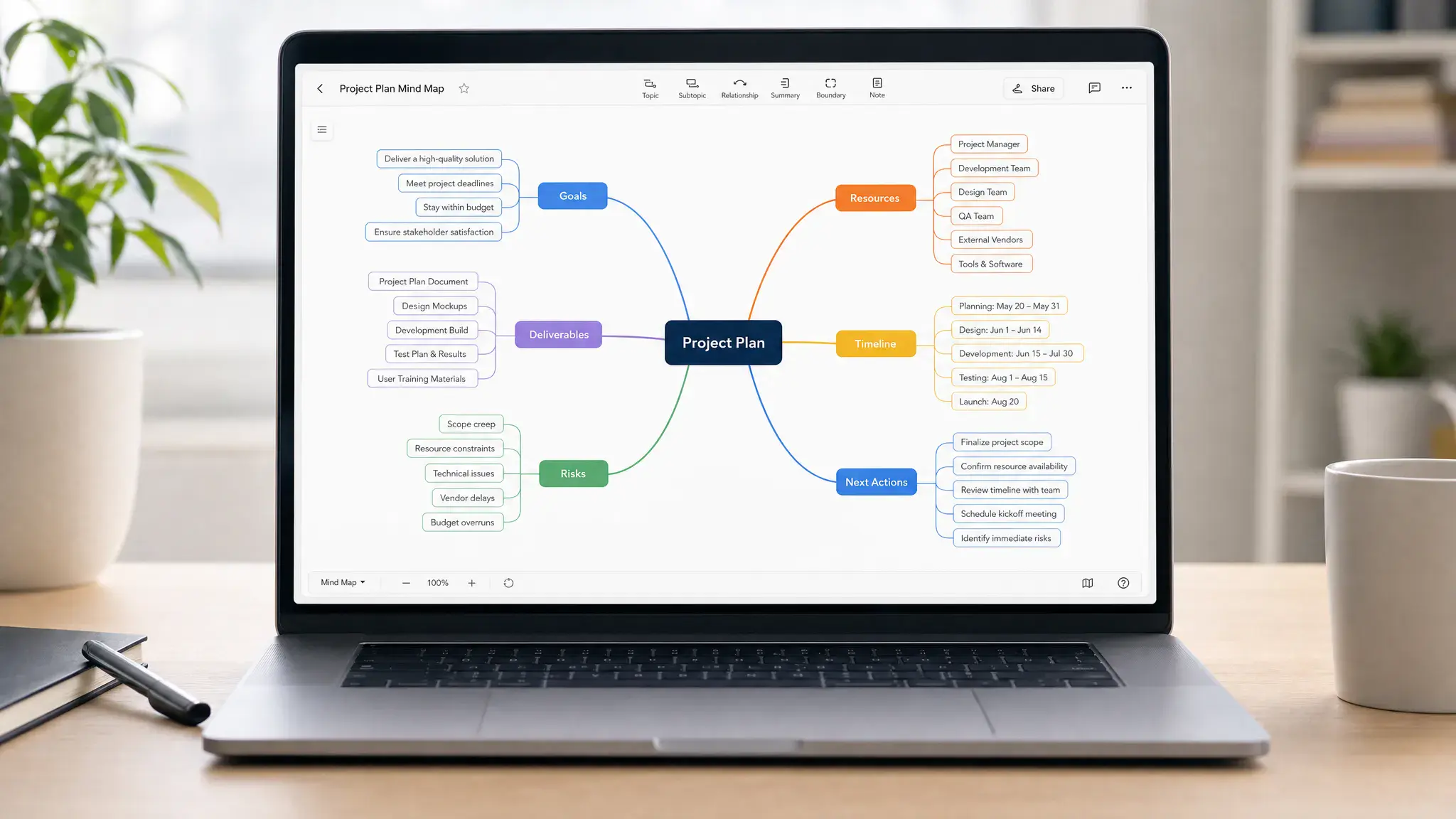
Next, create your main branches. For most projects, useful branches include scope, deliverables, audience, milestones, stakeholders, risks, resources, dependencies, and open questions. These categories prevent the map from becoming a random idea dump.
Once the branches are in place, invite contributions. During a live session, encourage people to add ideas first and critique later. Mind maps are most useful when they reveal the range of possibilities before the team narrows them down.
After brainstorming, group related ideas and remove duplicates. This is the moment when the map starts becoming a plan. Merge similar branches, rename vague ideas, and move anything that does not support the project goal into a parking lot section.
Then identify decisions and next actions. Every major branch should end with either a defined task, a decision to make, a risk to monitor, or a question to answer. If a branch does not lead to action or clarity, it may not belong in the plan.
Finally, transfer the execution-ready items into your project management system. Add owners, due dates, dependencies, and priority levels. Keep the mind map as a planning reference, but do not expect it to handle every detail of delivery.
Common mistakes to avoid
The most common mistake is treating a mind map like the final project plan. A mind map is excellent for structure, context, and early decisions, but it is usually not enough for deadlines, accountability, and progress tracking.
Another mistake is letting the map become too large. If every small detail is added, the map becomes harder to read and less useful. A good project map shows the shape of the work, not every micro-task.
Teams also struggle when they skip the cleanup phase. Brainstorming creates raw material. Planning requires editing. Set aside time after the session to organize branches, clarify wording, remove duplicates, and highlight priorities.
Finally, avoid choosing a tool only because it has the most features. The best mind mapping tool is the one your team will actually use consistently. A lightweight tool that supports your process is better than a powerful platform that creates friction.
Frequently Asked Questions
What is the best mind mapping tool for project planning? Miro is the best overall choice for collaborative project planning because it supports mind maps, workshops, diagrams, templates, and real-time teamwork. If you want a dedicated mind mapping app, MindMeister is a cleaner option. If you want to turn ideas into tasks, ClickUp Mind Maps may be the better fit.
Are mind mapping tools better than project management tools? No. Mind mapping tools and project management tools serve different purposes. Mind maps help you explore and structure ideas. Project management tools help you assign work, track deadlines, manage dependencies, and report progress. Many teams benefit from using both.
What is the best free mind mapping tool? Coggle is a good simple option for quick browser-based maps, while tools like Miro, Whimsical, and MindMeister may offer free or entry-level options depending on current plan details. Always check each provider’s latest pricing and feature limits before choosing.
Can mind maps be used for Agile planning? Yes. Mind maps can help Agile teams break down epics, explore user stories, map dependencies, and plan product discovery. However, sprint execution should still happen in a tool designed for backlog management, task tracking, and team visibility.
What should a project mind map include? A useful project mind map usually includes the project goal, deliverables, stakeholders, milestones, risks, dependencies, resources, open questions, and next actions. The exact structure depends on the project, but every branch should help the team make better planning decisions.
Final recommendation
For most teams, Miro is the best all-around mind mapping tool for planning projects because it supports both brainstorming and broader visual collaboration. MindMeister is the best choice if you want a focused mind mapping experience. ClickUp Mind Maps is the strongest option when the priority is turning ideas into assigned work.
If you plan solo, Xmind and MindNode are excellent. If you need fast product planning, try Whimsical. If your work is creative and asset-heavy, Milanote may feel more natural than a traditional mind map.
The right choice depends on where your planning breaks down. If your team struggles to generate ideas, choose a creative mapping tool. If your team struggles to organize ideas, choose a structured mind mapping app. If your team struggles to execute, choose a tool that connects the map to tasks, owners, and deadlines.



